


A fully integrated karaoke experience: from a single tap on the home screen to the last note of the night.
The problem we kept hearing
Karaoke has always been a popular request on superyachts. Owners want it. Guests love it. But delivering it properly has never been as straightforward as it should be.
Until now, the only way to offer karaoke on board was to connect a standalone karaoke machine to OMNIYON as an external source. It worked, in the loosest sense, but it was a blunt instrument. The machine sat outside the system, unaware of OMNIYON’s zones, profiles, or switching logic. There was no real integration: just a cable in, a source on the matrix, and a lot of manual intervention whenever someone wanted to sing. No automatic source switching, no app-based control, and no way to manage microphone levels or presets from the screen guests were already using for everything else. And a dedicated karaoke machine is one more piece of hardware to manage, update, and eventually replace.
For ETOs, chief engineers, and AV/IT integrators, it also meant stitching together components that were never designed to talk to each other: audio routing through a Yamaha DSP, an Apple TV running a karaoke app, and source switching across an NVX matrix, each configured independently, none aware of the others.
The result? A setup that required expert knowledge every time someone wanted to use it, and left the owner or guest dependent on crew to make it happen. That is not the experience anyone had in mind.
Why we decided to solve it
At YachtCloud, we build OMNIYON around one principle: the experience on board should feel effortless for the people using it, and manageable for the people running it. Karaoke was a clear gap, technically achievable, but nowhere near as seamless as it should be. It also kept coming up as a recurring request across multiple clients in the yacht segment.
We set out to bring karaoke fully inside OMNIYON: one place to configure it, one tap to start it, one remote to control everything. By building the integration around an Apple TV app rather than a dedicated karaoke machine, we also removed a real maintenance burden, no proprietary hardware to service, no separate firmware to track, and no single point of failure that takes the whole experience down with it.
We also designed the architecture generically from the start, so future hardware types and DSP brands can be added without rebuilding the app. When the underlying hardware changes, the experience stays exactly the same.
How it works
The integration connects three hardware components through OMNIYON’s backend:
- A Yamaha DSP handles all audio processing, microphone levels, music mix, and reverb.
- An Apple TV runs the karaoke application of your choice.
- An NVX matrix manages source switching across zones.
All business logic, DSP addressing, and preset management lives in the OMNIYON backend, not in the app. The app is a thin client: it renders the interface based on a state object from the backend, and dispatches user actions as logical commands. This means no app update is needed when hardware changes, and third-party systems can access karaoke controls through the public OMNIYON API using the same data contract.
All configuration happens inside OMNIYON Manager. ETOs set up karaoke zones on the Yamaha DSP configuration screen, up to four zones per DSP, and link each zone to an NVX transmitter input configured as a Karaoke source. The Apple TV, the karaoke app, and the Yamaha zone are tied together in one place. Karaoke is also included in the standard OMNIYON product, no additional licence required.
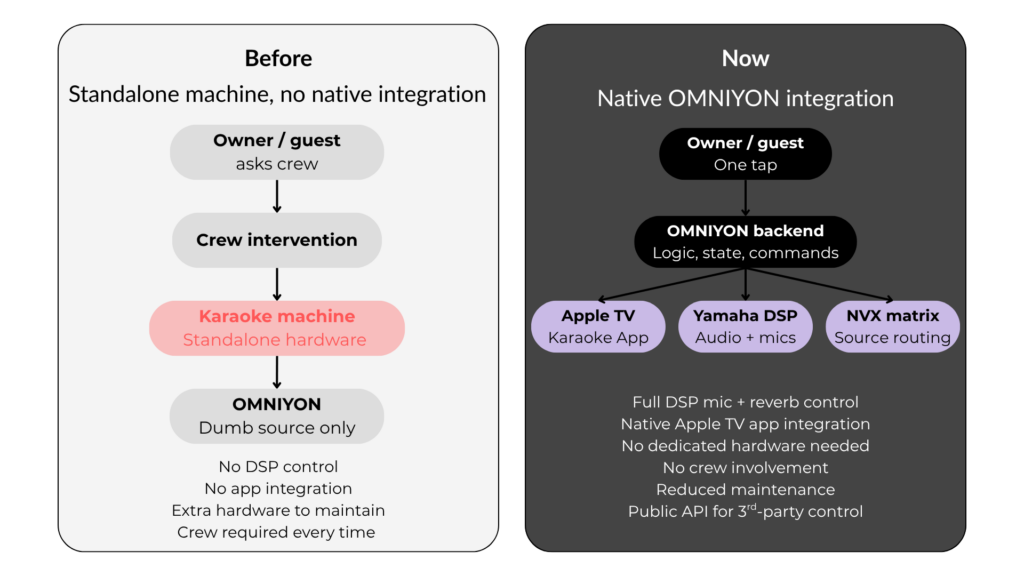
Figure 1: Old vs New Architecture – OMNIYON Karaoké
What the crew and integrator get
For ETOs and AV/IT integrators, configuration is clean, logical, and in one place, instead of custom DSP programming spread across multiple systems:
- A dedicated Karaoke tab in the Yamaha DSP configuration screen, alongside existing Matrix Input and Volume Scale tabs. Up to four independent zones per DSP, each with its own microphone count (two or four), preset names, and startup behaviour.
- Karaoke set up directly on the NVX transmitter input screen, the same place integrators already manage other AV sources. Selecting device type “Karaoke” surfaces all relevant fields in one view.
- The Karaoke icon appears automatically in the home profile picker as soon as the integration is created. No separate step required.
- Smart zone assignment: the Yamaha zone dropdown only shows zones that are enabled and not already bound to another integration. Misconfiguration is prevented by design.
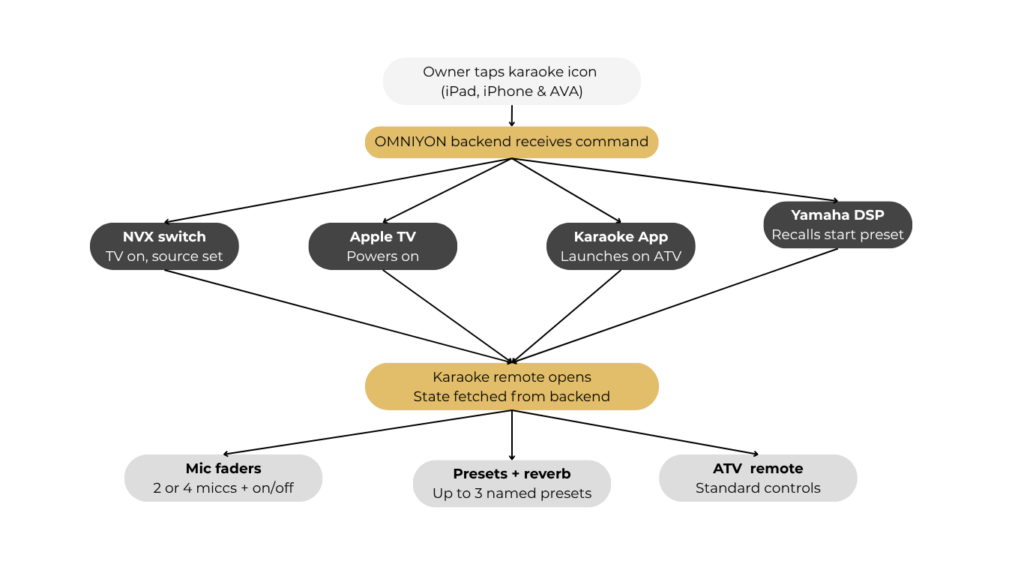
Figure 2: One tap sequence on OMNIYON Karaoke integration
What owners and guests get
From the front end, karaoke is a single icon on the home screen. One tap triggers everything simultaneously: the NVX matrix switches source, the Apple TV powers on, the karaoke app launches, and the Yamaha DSP recalls the start preset, all without any crew involvement.
The karaoke remote, available on iPad, iPhone, and AVA, gives full control from one screen: microphone faders for two or four mics with individual on/off, music and reverb controls with type selection, up to three named system presets, and the standard Apple TV remote. On iPhone, mic faders tuck behind buttons and expand on tap. On AVA, the icon and start flow work identically; the full mixer is available on iPad or iPhone when needed.
If a second guest opens the karaoke remote on another device, both screens reflect exactly the same state, no duplication, no conflict. The backend is the single source of truth.
Available now
Karaoke integration is available now in OMNIYON, included in the standard product at no additional licence cost. If you are an ETO, chief engineer, or AV/IT integrator working on a project or if you want to understand what is involved in adding karaoke to an existing OMNIYON installation, we would be glad to walk you through it.
Get in touch with the YachtCloud team at [email protected]